Accept ACH Payments for Small Businesses: Set Up in Days, Meet NACHA
Accept ACH Payments for Small Businesses: Set Up in Days, Meet NACHA
Yes, for most small service businesses that invoice clients or run subscriptions, accepting ACH payments is worth adding. It cuts processing costs, reduces manual chasing, and fits how you already bill customers. The fastest path is either turning it on through your business bank account or through a payment processor that plugs into your invoicing software. Standard transfers settle in a few business days on average, and Same Day ACH exists for anything more urgent.
TL;DR:
- ACH is most beneficial for recurring, predictable payments such as subscriptions, B2B invoicing, and high-ticket transactions, reducing costs significantly.
- It settles in one to three business days, with same-day ACH available for urgent payments up to $1 million, making cash flow planning essential.
- Verifying customer accounts via micro-deposits or instant verification minimizes returns caused by incorrect or revoked authorizations.
- Small businesses should match ACH collection methods to their existing billing workflows, using recurring debits, payment links, or virtual terminals accordingly.
- Choosing a processor that supports your specific collection flow, offers flexible verification options, and has transparent pricing optimizes ACH implementation.
Table of Contents
- Should Your Business Accept ACH Payments?
- How Does ACH Payment Processing Actually Work?
- Practical Ways to Accept ACH Payments
- How to Set Up ACH Acceptance: A Step-by-Step Checklist
- Costs and Timing: What ACH Actually Costs and How Fast It Moves
- Reducing Fraud and Returns in ACH Payment Processing
- How to Choose an ACH Processor or Solution
- A Real-World Example: Streamlining Collections With Integrated Invoicing
- What to Prioritize After You Turn On ACH
- Get ACH Payments Running Inside Your Existing Workflow
- Sources
Should Your Business Accept ACH Payments?
ACH makes the most sense when money moves on a predictable schedule. Subscription businesses, contractors billing recurring maintenance clients, and B2B companies invoicing on net-30 terms all benefit because ACH payment processing was built for exactly this kind of repeat, planned transaction. High-ticket invoices are another strong fit. Nobody wants to hand over 3% of a $15,000 project payment to a card network when a bank transfer accomplishes the same thing for a fraction of the cost.
Cards still make sense in specific situations. Point-of-sale purchases under $50, walk-in customers who expect to tap a card, and clients who chase credit card rewards points all favor plastic. Forcing a first-time customer making a small purchase into a bank-linking flow tends to create friction, not savings.
The tradeoff is real and worth stating plainly:
- ACH costs less per transaction but settles slower than a card swipe.
- Returns on ACH can take longer to surface than a declined card, sometimes two to three days after you thought the money was yours.
- Cards give near-instant authorization; ACH asks you to trust the process a little more.
Most service businesses land on a hybrid: cards for one-off or in-person work, ACH for anything recurring or invoice-driven. That split alone often cuts your blended processing costs meaningfully without changing how customers experience checkout.
How Does ACH Payment Processing Actually Work?
ACH moves money in batches, not instantly, and understanding that batch structure explains almost everything else about how the system behaves. A bank or credit union submits transactions to the ACH network, which sorts and forwards them to receiving banks in scheduled windows throughout the day rather than one at a time.
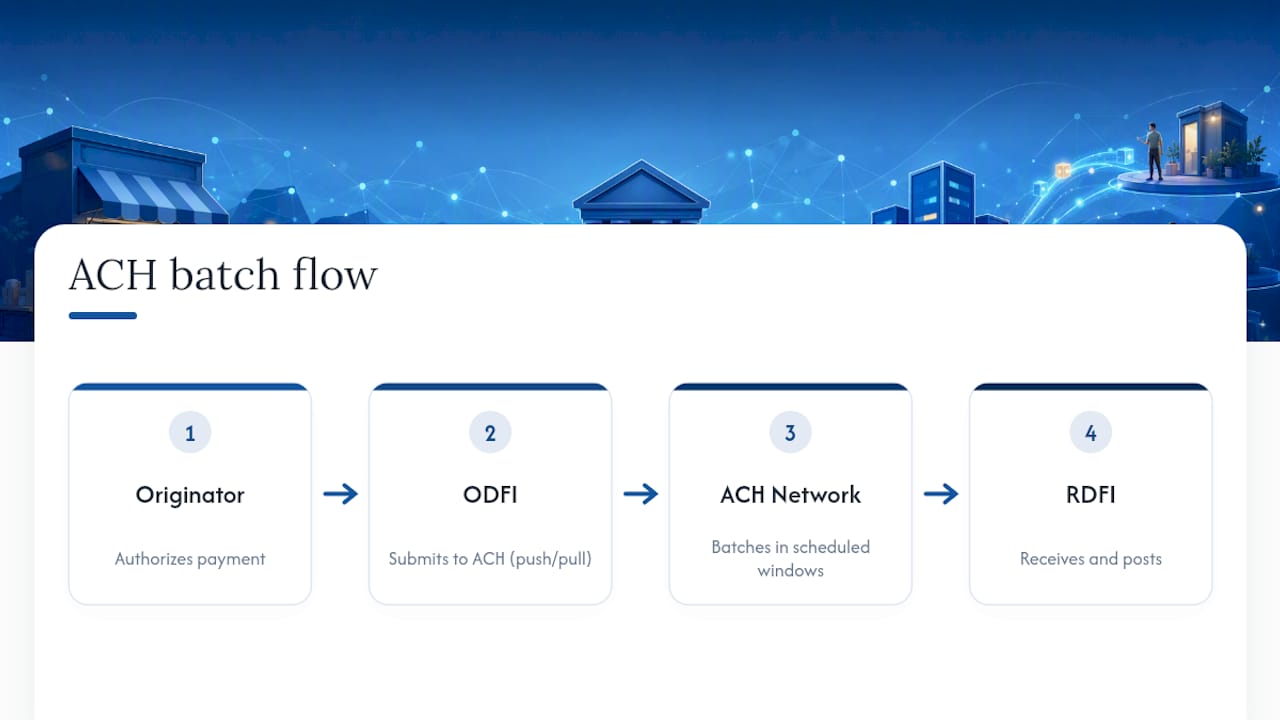
Every ACH transaction has two ends: the Originating Depository Financial Institution (ODFI), which is the bank submitting the transaction on the originator’s behalf, and the Receiving Depository Financial Institution (RDFI), the customer’s bank on the other side. Your business is usually the originator working through the ODFI.
There are two directions money can move. An ACH credit is a push: the originator sends money out, the way payroll deposits or vendor payments work. An ACH debit is a pull: the originator requests money from the receiver’s account, which is how most businesses collect customer payments. If you are billing a client for a service, you are almost always pulling funds via an ACH debit rather than waiting for them to push a payment to you.
Every ACH transaction also carries a Standard Entry Class (SEC) code that tells the network what kind of transaction it is and what rules apply. A consumer paying a recurring invoice typically falls under a different code than a business-to-business transfer, and the distinction affects authorization requirements and return timelines.
None of this happens without permission. NACHA governs the operating rules for the entire network, and originators are required to obtain and retain proof of authorization before pulling funds from a customer’s account. That authorization has to specify the amount, the frequency, and how the customer can revoke it. Skip this step and you are not just risking a return. You are violating the rules that let you originate ACH transactions at all.
Practical Ways to Accept ACH Payments
How you collect ACH payments depends less on your industry and more on how you already bill. Match the collection method to your existing workflow instead of bolting on something new:
- Recurring billing and subscriptions work best with ACH debit authorized once at signup, then pulled automatically each cycle. This is the closest thing to “set it and forget it” for gym memberships, retainer clients, or SaaS-style billing.
- Invoice-driven businesses should add a bank-pay button directly on the invoice. The client clicks, links or enters their account, and authorizes the specific payment. This keeps you the originator on a one-time debit rather than a standing authorization.
- Payment links and hosted checkout pages work well for businesses that quote a job and want payment before starting. Send a link, the customer pays by ACH or card, and you are not stuck building your own payment form.
- Virtual terminals let you key in a customer’s account and routing number manually, which matters for phone orders or in-person work where a physical terminal is not practical.
- Text-to-pay sends a payment link by SMS, which service technicians use constantly. A plumber finishes a job, texts the invoice, and gets paid before pulling out of the driveway.
- Client-initiated bank transfers put the ACH credit in the customer’s hands. Some B2B clients prefer to push payment themselves rather than authorize you to pull it, especially for large one-time invoices.
Phone and in-person ACH acceptance carry one extra requirement: you need a way to capture and store authorization even when there’s no signature on paper. A recorded verbal authorization or an emailed confirmation both satisfy this, but skipping it entirely does not.
How to Set Up ACH Acceptance: A Step-by-Step Checklist
Getting your first ACH payment collected takes less time than most business owners expect, usually a few days rather than weeks, if you work through these steps in order.
Confirm your bank account can originate ACH. Not every business checking account comes with ACH origination enabled by default. Call your bank or check your online banking settings, and ask specifically about ACH debit origination if you plan to pull payments from customers rather than just receive pushed deposits.
Decide between your bank directly and a processor. Banks offer ACH origination tools, but they tend to be built for back-office use, not customer-facing checkout. A payment processor that integrates with your invoicing software usually gets you a payment link, hosted page, or embedded checkout much faster than building on top of raw bank tools.
Complete onboarding and KYC. Whichever route you choose, expect to verify your business identity, provide banking details, and answer a few questions about expected transaction volume. This is standard “know your customer” screening, not a sign something is wrong.
Set up account verification for your customers. You have two main options here:
- Micro-deposits, where you send two small test deposits and the customer confirms the amounts, which typically takes one to two business days to complete.
- Instant verification, where the customer logs into their bank through a secure connection and confirms ownership immediately. Instant verification tools like Plaid can also apply risk scoring, which lets you skip holds on low-risk transactions while still flagging ones that need a closer look.
Capture and store authorization for every customer. Save the date, amount, frequency, and method of authorization for each transaction. NACHA requires originators to produce this proof within 10 days if a bank ever requests it, so build this into your process from day one rather than scrambling later.
Reconcile and test before going live. Run a small test transaction, confirm it settles as expected, and set up a simple system to log return codes if they come up. Then flip it on for real customers.
Pro Tip: Run your first few live ACH transactions with your smallest, most reliable clients rather than your biggest invoice. It’s a lot easier to troubleshoot a $200 payment than a $20,000 one.
Costs and Timing: What ACH Actually Costs and How Fast It Moves
ACH payment processing typically costs less per transaction than card processing, and the gap is often the entire reason a business bothers switching. Small businesses generally see lower per-transaction costs with ACH compared to cards, with pricing built around a few different structures.
| Fee structure | How it works | Where it fits |
|---|---|---|
| Flat per-transaction fee | A set fee regardless of amount, often a few cents to a few dollars | High-dollar invoices where a percentage fee would be expensive |
| Percentage-based | A small percent of the transaction, often around 1%, frequently with a cap | Mixed transaction sizes where predictability matters less than proportional cost |
| Bank-direct origination | Sometimes free or very low-cost through your existing bank | Businesses comfortable managing origination without a processor’s tools |
The savings show up most clearly on large transactions. A 1% card processing fee on a $10,000 invoice costs $300; a capped ACH fee on the same invoice might run a fraction of that.
Timing works differently than cards, and it matters for cash flow planning:
- Standard ACH transfers typically settle in one to three business days, with the network processing batches multiple times per day rather than continuously.
- Same Day ACH can handle transactions up to $1,000,000, giving businesses a faster option for urgent or high-value payments without switching to a card network.
- FedACH services provide the settlement infrastructure banks use to process these batches, including same-day processing windows.
If your business runs tight on cash flow, factor the standard one to three day settlement window into how you time payroll or vendor payments, especially in the first few weeks after switching.
Reducing Fraud and Returns in ACH Payment Processing
Returns are the main operational headache with ACH, and most of them trace back to a handful of causes: insufficient funds, an incorrect account or routing number, or a customer revoking authorization. Each return carries a code, and reading those codes correctly tells you whether to retry, contact the customer, or write off the transaction.
Verification at the front end prevents most of this. Micro-deposits confirm account ownership over a day or two, while instant verification confirms it immediately by connecting directly to the customer’s bank. Risk scoring tools can reduce unnecessary holds on low-risk transactions while still catching the ones worth a second look.
Authorization retention isn’t optional. NACHA requires originators to keep proof of authorization on file and produce it within 10 days of a request, and recurring debit authorizations need clear instructions for how the customer can revoke them.
- Log every return code and review patterns monthly, not just when a customer complains.
- Store authorization records with the date, amount, and method, and back them up outside your primary payment system.
- Reverify account details if a customer’s payment method fails more than once in a short period.
Pro Tip: Set up an automatic email or text alert the moment a return hits, before your accounting software reconciles it days later. Catching a bad account number fast means you fix it before the client thinks they’ve paid and moved on.
How to Choose an ACH Processor or Solution
Match the processor to how you actually collect money, not to a generic feature list. If most of your revenue comes through invoices, prioritize a solution with a built-in bank-pay button and hosted payment pages over one built primarily for developers.
- Confirm support for the specific flows you need: recurring debits, payment links, virtual terminals, or text-to-pay, since not every processor covers all four.
- Compare pricing models directly against your typical transaction size. Flat fees favor high-ticket invoices; percentage fees with caps favor a mixed range of transaction sizes.
- Ask about monthly minimums and whether fees apply even in months with no transactions.
- Check verification options. A processor offering both micro-deposits and instant verification gives you flexibility for different customer types.
- Weigh integration effort honestly. Plug-and-play options connect to existing invoicing software with a few clicks; API-based integrations require developer time and ongoing maintenance, which only makes sense if you have engineering resources to spare.
- Negotiate caps on percentage-based fees if you regularly process large invoices, since an uncapped 1% fee on a $50,000 payment adds up fast.
A processor built for service businesses, sometimes bundled inside broader business software like Roll With Paid, tends to save setup time compared to stitching together a standalone payment gateway.
A Real-World Example: Streamlining Collections With Integrated Invoicing
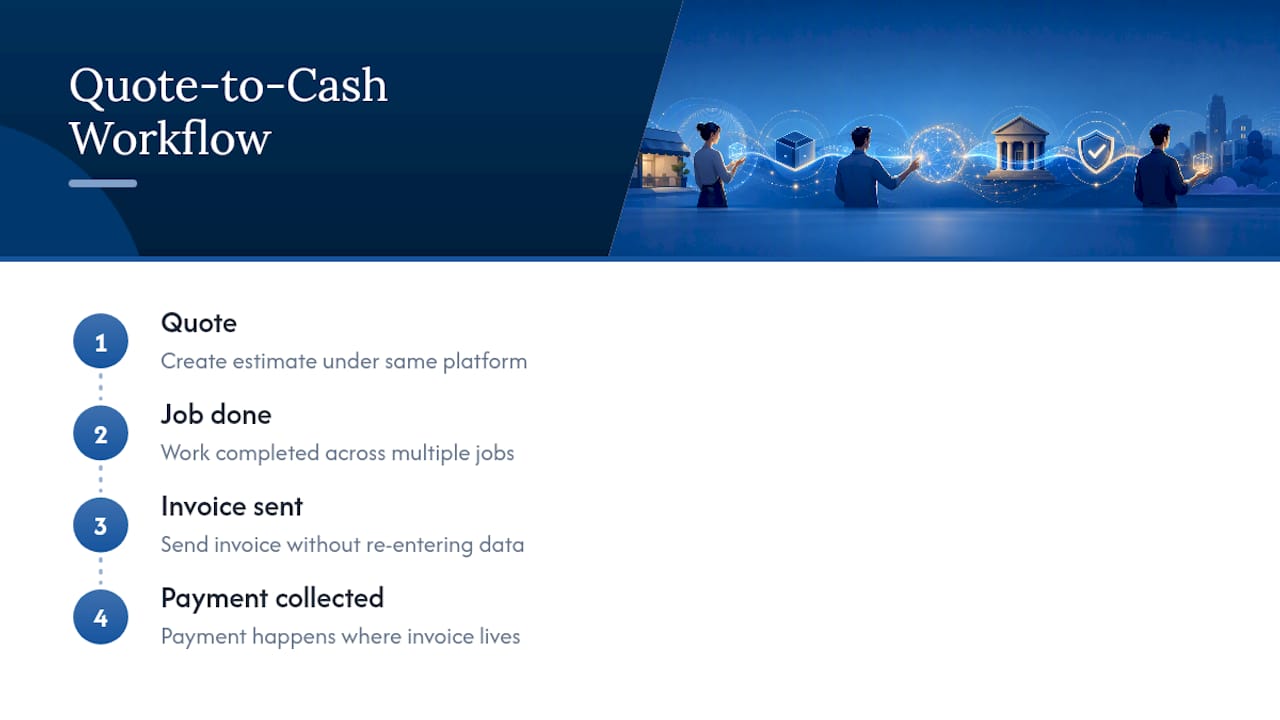
Some invoicing and payment tools aim to close the gap between sending a quote and actually getting paid by keeping quotes, invoices, and payment collection under a single login, which cuts out the manual re-entry that eats up time in most small service businesses.
Users of such platforms may experience faster invoicing and improved cash flow, largely because the payment step happens right where the invoice lives instead of requiring a separate trip to a different tool. That matters most for contractors and service providers juggling multiple jobs at once, where every extra step between “job done” and “invoice sent” is a place things fall through the cracks. The quote-to-cash workflow shows how that gap quietly costs businesses money when it’s left unaddressed.
What to Prioritize After You Turn On ACH
Get three things done in your first 90 days: confirm your authorization records are actually being stored correctly, track your return rate weekly instead of monthly, and compare your real processing cost per transaction against what cards were costing you before.
Skip custom API integrations unless you have genuine engineering bandwidth. Most small businesses do better with an off-the-shelf processor. Watch days-to-fund, return rate, and cost per transaction. Those three numbers tell you whether ACH is actually working for you.
— Philip
Get ACH Payments Running Inside Your Existing Workflow
Most of the setup steps above involve juggling a separate payment processor, a separate invoicing tool, and a spreadsheet trying to connect the two. Some platforms integrate ACH-ready payment collection directly into the same platform where quotes and invoices are created, so clients can pay a bank-pay invoice without requiring a second login or reconciling two systems by hand.
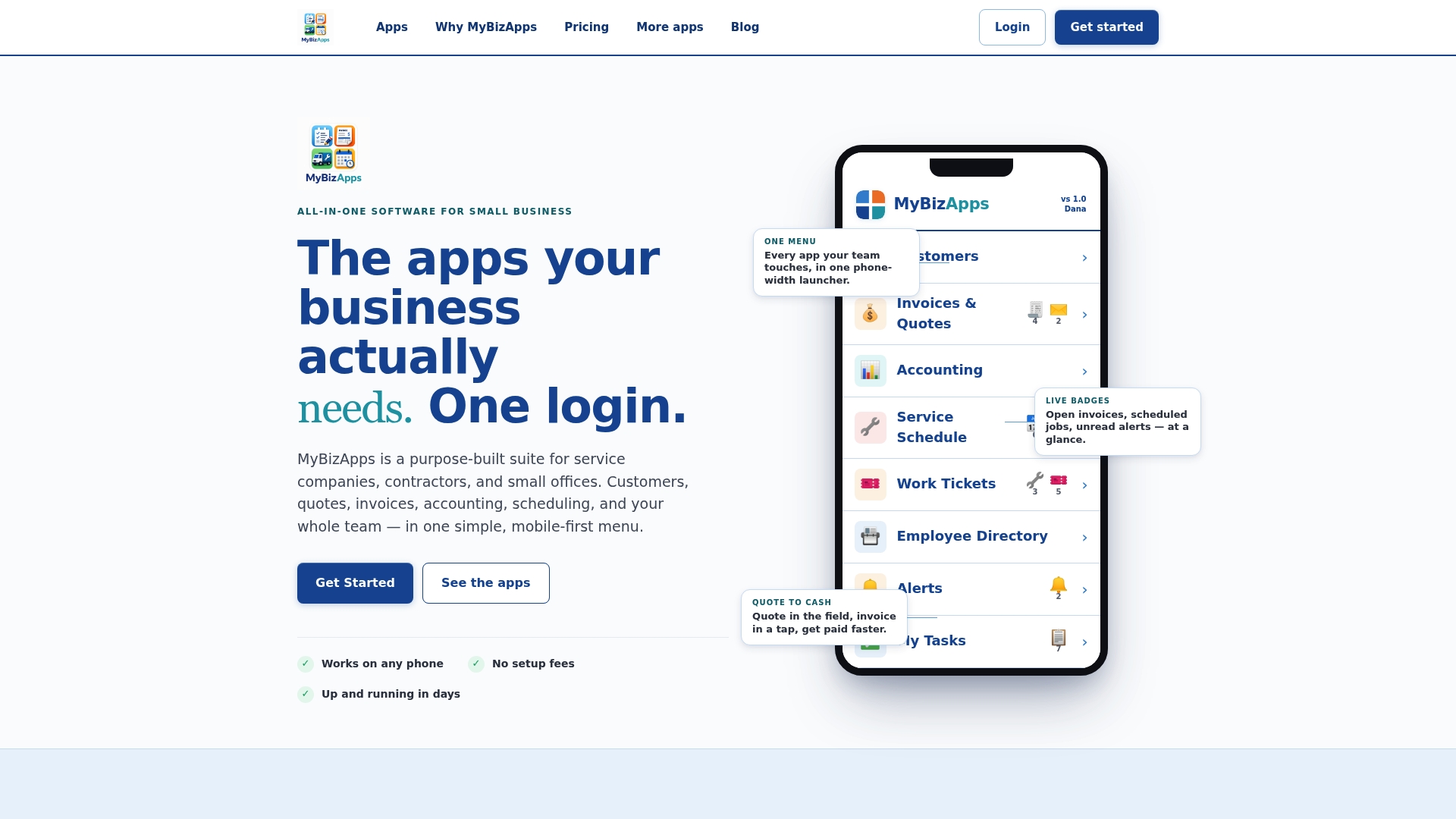
That matters most for the contractors and small service teams who don’t have a bookkeeper checking three dashboards every morning. One invoice goes out, one payment comes back, and it lands in the same place your job history and customer records already live. If you want to see what that setup actually costs, check the Mybizapps price sheet and compare it against what you’re currently paying across separate invoicing and payment tools. Starting a trial takes a few minutes, and you can have your first ACH-ready invoice out the same day.
Sources
- ACH payments fact sheet
- How ACH works | ACH Guide for Developers
- Federal Reserve Financial Services — ACH