Quote to Cash: Accept Credit Card Payments for Small Businesses
Quote to Cash: Accept Credit Card Payments for Small Businesses
Yes, you can accept credit card payments online, in person, and remotely, often within days. The fastest route is signing up with an all-in-one payments platform that bundles processing, a payment gateway, and reporting into one login. Most providers get you approved within 1 to 5 business days once you submit your tax ID and bank account details.
TL;DR:
- Processing can be approved in as little as one business day, especially when all necessary documents like tax ID and bank info are prepared beforehand.
- Small businesses usually prefer digital invoices, payment links, or checkout widgets over custom shopping carts for quicker setup and lower compliance overhead online.
- In-person payment options include countertop terminals, integrated POS systems, mobile card readers, and contactless tap-to-pay, all requiring EMV, NFC, and fallback magnetic stripe support.
- Virtual terminals for remote payments increase fraud risk and processing fees, making invoice links a safer choice for repetitive online billing.
- Choosing the right setup depends on analyzing fee structures, payout schedules, reserve policies, and integration capabilities suited to the business’s transaction volume and cash flow needs.
Table of Contents
- Quick Checklist: The Simple Path To Get Started Today
- How To Accept Credit Card Payments Online
- How To Accept Credit Card Payments In Person
- How To Accept Credit Card Payments Remotely (Phone, Mail Order, Invoices)
- What It Costs: Fees, Pricing Models, And How To Forecast Expenses
- Security And Compliance Basics Every Small Business Must Know
- How To Choose The Right Payment Setup For Your Business
- Author Perspective: Payments As Part Of Operations
- Why MyBizApps Is A Practical Way To Accept Payments And Speed Cash Flow
- Sources
Quick Checklist: The Simple Path To Get Started Today
Before you pick a provider, figure out which channels you actually need. A contractor billing after a job needs something different than a boutique running an online store.
- Pick your channels. Decide whether you need online checkout, in-person card reading, phone/invoice billing, or all three.
- Gather your documents. Have your EIN or SSN, business bank account and routing number, and an estimate of monthly card volume ready before you apply.
- Choose your setup type. Decide between an all-in-one platform (processing, gateway, and reporting under one account) or a separate merchant account paired with a standalone gateway.
- Turn on your tools and test them. Activate checkout, your POS or card reader, or a virtual terminal, then run a small test transaction and confirm payouts land in your bank account on schedule.
Having your documents ready ahead of time is what separates a same-day approval from a week of back-and-forth with underwriting.
How To Accept Credit Card Payments Online
Online acceptance breaks down into two basic setups. A hosted checkout page redirects the customer to a payment screen the provider manages, which keeps your PCI compliance burden low and takes almost no development work. An embedded gateway keeps the customer on your site the whole time, giving you more control over branding but requiring more technical setup and a larger slice of PCI responsibility.
Most small businesses never touch either extreme. Instead they use:
- Payment links you email or text, no website required.
- Digital invoices with a “pay now” button baked in.
- Checkout widgets that drop into an existing site with a few lines of copy-paste code.
If you bill the same customer repeatedly, look for recurring billing support with tokenization, which stores an encrypted stand-in for the card number so you’re not holding raw card data yourself. That single feature does more to shrink your compliance headache than anything else you’ll set up.
Fraud controls matter more online than anywhere else. Look for 3D Secure 2 (3DS2) support and configurable risk rules that flag mismatched addresses or unusual order sizes before they become chargebacks. Payouts on most platforms land in your bank account one to two business days after the transaction clears.
Pro Tip: Send payment links instead of building a shopping cart if you only take occasional deposits or one-off payments. It’s the fastest way to accept credit card payments online without touching a line of code.*
How To Accept Credit Card Payments In Person
Brick-and-mortar and mobile sellers have three real hardware choices, and picking the right one depends on how you move.
- Countertop terminals work best for a fixed checkout counter, like a salon front desk or a retail register.
- Integrated POS systems combine the card reader with inventory and sales reporting, useful if you’re already tracking stock.
- Mobile card readers plug into or pair with a phone or tablet, ideal for contractors, food trucks, and anyone working off-site.
- Tap-to-pay on phone turns a standard smartphone into a reader with no extra hardware at all, handling contactless cards and mobile wallets directly.
Whatever you choose, confirm it supports EMV chip reading, NFC for contactless and tap-to-pay, and magnetic stripe as a fallback for older cards. Skipping EMV support isn’t just inconvenient. It shifts fraud liability onto you if a chip card gets swiped instead of inserted or tapped.
Connectivity is worth checking before you buy, not after. Readers that only work over Wi-Fi will strand you at an outdoor job site or a farmers market booth; look for one with a cellular backup or offline mode that queues transactions until signal returns. On receipts and tips, most modern readers let you customize tip prompts and send digital receipts by text or email, which also gives you a paper trail when you reconcile the day’s card sales against your bookkeeping at closing. That reconciliation step is where a lot of small operators lose track of small discrepancies, so pull your batch report daily rather than weekly.
How To Accept Credit Card Payments Remotely (Phone, Mail Order, Invoices)
A virtual terminal is a web-based screen where you manually key in a customer’s card number to process a payment without them being physically present, the standard tool for phone orders, mail order, and invoice-based businesses. Because the card isn’t swiped or tapped, these are “card-not-present” transactions, and they carry more fraud risk and higher processing fees than in-person swipes.
Two workflows cover most small businesses:
- Phone payments: the customer reads their card number aloud, you key it into the virtual terminal, and you run an AVS check (confirming the billing address matches) and a CVV check (confirming the three or four digit security code) before submitting.
- Invoice and payment links: you send a digital invoice or link, the customer enters their own card details on a secure page, and the system automatically applies AVS/CVV checks without you touching the card number at all.
Between the two, invoice links carry less fraud exposure since you never key in the number yourself, and they save time on repetitive phone orders.
Pro Tip: Always require CVV entry on keyed transactions, even for repeat customers. Providers that enforce it consistently see far fewer successful chargeback disputes than those that let it slide.
What It Costs: Fees, Pricing Models, And How To Forecast Expenses
Every card transaction runs through three layers of cost. Interchange goes to the cardholder’s bank and is set by the card networks, not your processor. Network assessments are small fees Visa, Mastercard, and other networks charge on top. Processor markup is what your provider adds for its own service, and that’s the only layer you can meaningfully negotiate.
How that shakes out depends on which pricing model you pick:
- Flat-rate pricing charges one fixed percentage plus a small per-transaction fee, and it’s simplest for low-volume sellers who want predictable costs.
- Interchange-plus pricing passes through the actual interchange rate plus a fixed markup, which usually costs less at higher volumes but requires reading a statement carefully.
- Subscription pricing charges a flat monthly fee plus a much smaller per-transaction markup, often the cheapest option once you’re processing consistent volume.
Flat-rate tends to suit lower-volume merchants who value simplicity over shaving fractions of a percent, while interchange-plus rewards businesses processing enough volume to justify the extra bookkeeping. To forecast your own costs, multiply your average ticket size by your expected monthly transaction count, then apply each model’s rate to see which actually comes out cheaper at your volume.
Security And Compliance Basics Every Small Business Must Know
PCI compliance sounds intimidating, but most of the heavy lifting disappears the moment you stop touching raw card data yourself. Hosted checkout pages and tokenization, where the provider swaps your customer’s card number for an encrypted token, shrink your PCI scope dramatically because the actual card number never sits on your servers or in your files.
Three things to turn on immediately:
- Tokenization for any stored or recurring payment method.
- CVV and AVS requirements on every keyed or online transaction.
- Provider fraud tools, like velocity checks and risk scoring, which are usually a toggle in your dashboard rather than a separate purchase.
When a chargeback lands, respond fast and keep documentation: signed receipts, delivery confirmation, email threads, anything proving the charge was legitimate. Most disputes have a response window of just a few days, and providers that log AVS/CVV results automatically make that paperwork far easier to pull together.
Pro Tip: Keep transaction records and customer communications organized in one system rather than scattered across email and paper receipts. When a dispute hits, you’ll want that trail in seconds, not hours.
How To Choose The Right Payment Setup For Your Business
Run every provider through the same checklist before you sign anything.
- Compare fee structures against your actual average ticket and volume, not the advertised rate.
- Ask about underwriting speed and whether same-day or next-day approval is realistic for your business type.
- Check hold and reserve policies, since some providers freeze a percentage of funds for new or high-risk accounts.
- Confirm the payout schedule (next-day, two-day, or weekly) and whether it matches your cash flow needs.
- Look at reporting and integrations, especially whether the platform connects to your invoicing or CRM tools.
Questions worth asking directly during signup:
- “What triggers a reserve or hold on my funds?”
- “How are chargebacks handled, and what’s my response window?”
- “Is there a contract term, and what’s the early termination fee?”
Red flags to walk away from: pricing that’s never spelled out in writing, underwriting delays with no explanation, and reporting dashboards that hide transaction-level detail. If a sales rep can’t answer the reserve-policy question clearly, that’s your answer right there.
Author Perspective: Payments As Part Of Operations
Most small businesses treat payment acceptance as a bolt-on, something IT or a bookkeeper deals with separately from quoting and invoicing. That’s backwards. When payments live inside the same system as your invoices and customer records, the gap between sending a quote and seeing cash in your account shrinks dramatically, because there’s no manual step where someone re-enters a payment into a separate ledger. Contractors using integrated quote-to-cash workflows report faster invoicing and fewer reconciliation errors precisely because nothing has to be copied between systems. Start small: pick one workflow, whether it’s a service call or a repeat invoice, and route the payment through the same platform where the job was scheduled.
— Philip
Why MyBizApps Is A Practical Way To Accept Payments And Speed Cash Flow
Mybizapps is built for exactly the operational gap most small businesses hit: payments, invoicing, and scheduling living in separate tools that don’t talk to each other. Instead of bolting a payment gateway onto your existing invoicing software, Mybizapps handles customer records, quotes, scheduling, and credit card processing under one mobile-first login.
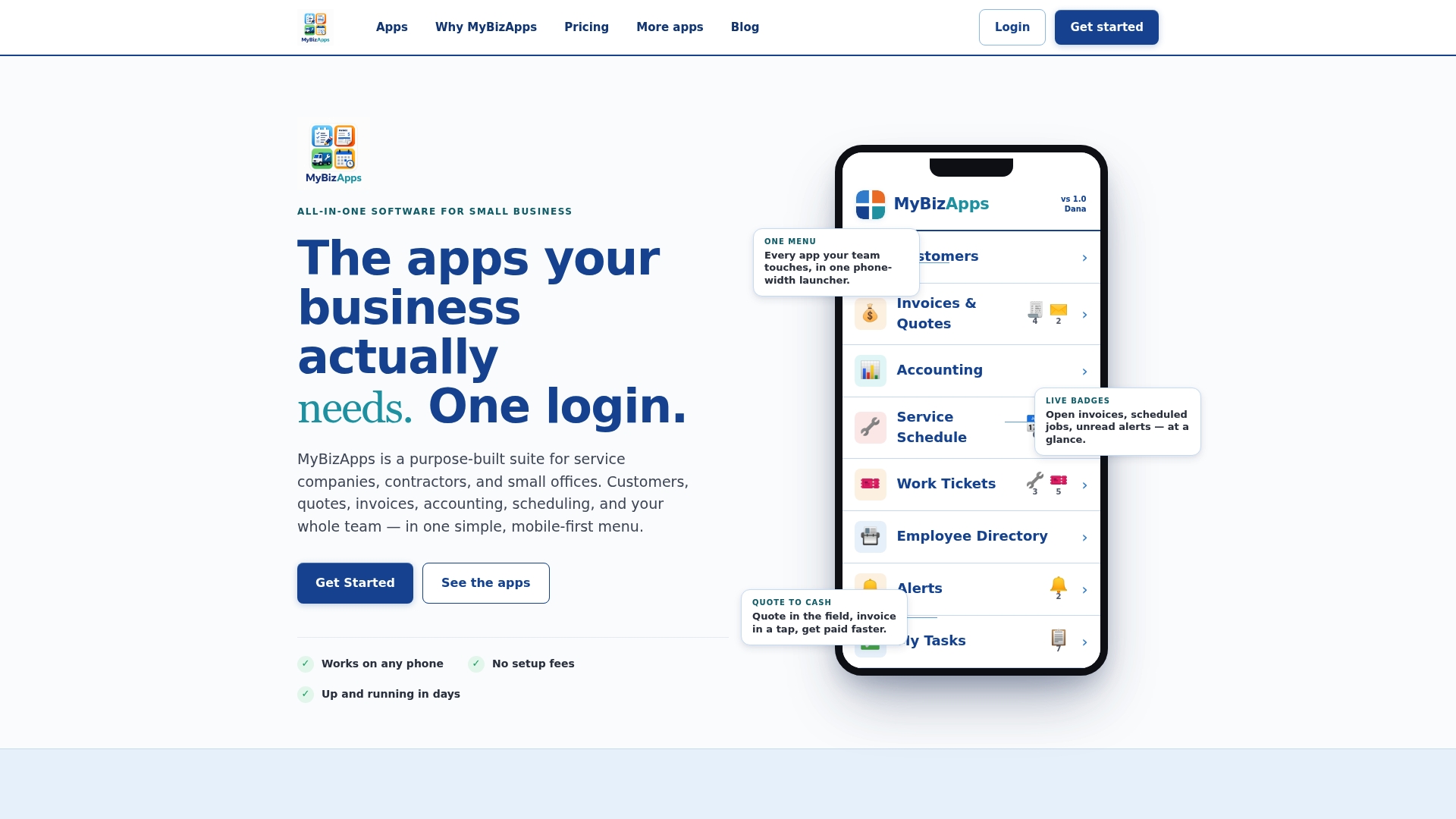
That matters most at the moment a job wraps up. When the invoice and the payment link live in the same system that tracked the job, there’s no manual re-entry, no separate reconciliation step, and no lag between finishing work and getting paid. Contractors and service companies using this kind of setup consistently report shorter gaps between quoting and getting paid, which is the whole point of tightening quote-to-cash in the first place. It also cuts down on the kind of bookkeeping cleanup that eats a Saturday morning during tax season.
If you’re comparing setups, check the Mybizapps price sheet for module pricing, or look at the full subscription tiers to see which plan fits your team size and transaction volume. Either page will tell you within a few minutes whether it’s the right fit for how you already work.
Sources
- How small businesses can start accepting credit card payments | Mastercard US
- How to accept credit card payments | U.S. Chamber (small business guide)