Get Paid 15 Days Faster: Automate Invoicing for Small Businesses
Get Paid 15 Days Faster: Automate Invoicing for Small Businesses
Yes, automate invoicing now. Start with scheduled sending, staged reminders, and automatic payment reconciliation. That single change typically cuts days sales outstanding from around 42 days to about 27 and saves owners 5 to 13 hours a week. Once reminders and reconciliation are running, layer in automated invoice generation from time-tracking or job data.
TL;DR:
- Automating invoice reminders and reconciliation reduces days sales outstanding from around 42 to about 27 days, freeing up cash flow.
- The common automation setup involves trigger events, workflow engines, accounting systems, payment processors, and reconciliation, with the main gap being integration.
- Starting with automated reminders and reconciliation yields faster results, while automating invoice generation is a later step after cash flow improves.
- Building exception handling into the automation from the start prevents mismatches and ensures smooth reconciliation of partial or grouped payments.
- Implementing a single-platform solution with scheduled sending, payment links, and automatic reconciliation can deliver immediate DSO improvements for small businesses.
Table of Contents
- How Does Automated Invoicing Actually Work?
- What Are the Real Benefits of Invoice Automation?
- How Do You Implement Invoice Automation Step by Step?
- Which Integration Pattern Fits Your Business?
- What Goes Wrong When You Automate Invoicing?
- How Long Does Invoice Automation Take to Set Up?
- Is Automated Invoicing Secure and Compliant?
- Can Invoice Automation Grow With Your Business?
- What Does Successful Invoice Automation Look Like in Practice?
- How Should You Evaluate an Invoice Automation Tool?
- Why Fast Reminders Beat Perfect Automation
- Get Invoicing, Payments, and Scheduling Under One Login
- Sources
How Does Automated Invoicing Actually Work?
Invoice automation is really six connected jobs, not one feature. Miss a link in the chain and you’re back to chasing spreadsheets by Thursday afternoon.
Generation kicks things off. An invoice gets created either manually, from a template, or triggered automatically by a completed job, logged hours, or a signed quote. Capture matters most for businesses receiving vendor invoices rather than sending their own. Optical character recognition and AI-based capture pull line items, totals, and vendor details off PDFs or scanned paper so nobody retypes numbers by hand.
Validation and matching checks the invoice against a purchase order, contract, or expected rate before anything gets approved. This is where most automated invoice processing setups apply rules: does the amount fall within tolerance, does the vendor match a record on file, is the tax calculation correct.
Approval routing sends the invoice to whoever needs to sign off, based on amount thresholds or department rules. Small operations often skip formal routing entirely and let the owner approve everything under a set dollar amount automatically.
Delivery pushes the invoice out by email with an embedded payment link, plus a reminder sequence that escalates if the due date passes. Payment detection and reconciliation close the loop: when money lands, the system matches it to the open invoice and marks it paid, ideally without anyone touching a bank statement.
The typical small-business setup looks like this:
- A trigger (job marked complete, time entry logged, recurring billing date)
- A workflow engine or built-in automation feature that fires the invoice
- The accounting system that records the transaction
- A payment processor that collects the money and reports status
- A reconciliation step that closes the loop automatically
Most teams already own two or three of these pieces. The gap is usually the connective tissue between them, which is exactly what AP automation guidance from G2 points to when describing rollouts that connect intake, matching, and an accounting system into one continuous flow.
What Are the Real Benefits of Invoice Automation?
The dollar impact shows up in three places: how fast you get paid, how many hours your team gets back, and how much friction disappears from collections.
On the cash flow side, businesses running automated reminders and reconciliation see days sales outstanding drop from an industry average of 42 days down to roughly 27. That’s not a rounding error. For a business billing $50,000 a month, shaving 15 days off collection time frees up real working capital you’d otherwise borrow against or wait on.
The Numbers That Matter: Small businesses using automated invoicing and reminder sequences report saving 5 to 13 hours per week that used to go into manual invoice creation, follow-up calls, and matching payments to open balances. A basic automation stack covering under 200 invoices a month typically runs $30 to $150 a month depending on the payment processing fees and workflow tools involved.
Reminders do more than nag. A staged escalation sequence, one gentle nudge a few days before the due date, a firmer one after, and a final notice past 30 days, measurably improves collection effectiveness and cuts down on chronic late payers who simply forgot rather than refused to pay. Automatic reconciliation adds a second benefit that’s easy to overlook: it catches early-payment discounts and short-pays the moment they happen instead of weeks later during a manual bank reconciliation.
Cost breaks down into three buckets worth budgeting separately:
- Monthly software subscriptions for the invoicing or accounting platform itself
- Payment processing fees, usually a percentage plus a flat fee per transaction
- Workflow or integration tooling if you need logic your core platform doesn’t offer natively
None of this requires an enterprise budget. It requires picking the right first automation and building outward from there.
How Do You Implement Invoice Automation Step by Step?
Here’s the five-step sequence that gets a small business from manual chaos to a working automated pipeline, roughly in the order that pays off fastest.
Step 1: Map your current process and set a target. Write down every step from “job finished” to “cash in bank,” including who touches the invoice and how long each stage takes. Set one or two measurable goals, a DSO target, an hours-saved target, or an error-rate reduction, so you know whether the rollout actually worked.
Step 2: Decide between an all-in-one platform and a modular stack. An all-in-one platform bundles invoicing, payments, scheduling, and accounting under one login, which cuts integration work to near zero. A modular stack (separate accounting software, a separate payment processor, and a workflow tool stitching them together) gives more flexibility, but means you own every connection point when something breaks. For most small service businesses without a dedicated ops person, fewer moving parts wins.
Step 3: Automate invoice generation first, or reminders first, depending on your bottleneck. If your invoices are accurate but slow to go out, connect your time tracker or job management tool so completing a job auto-generates the invoice. If invoices go out fine but payment takes forever, skip straight to reminders; that’s usually the faster win.
Step 4: Build the delivery and reminder sequence. Attach a payment link directly in the invoice email so paying takes one click. Set a reminder three days before the due date, another the day it’s due, and an escalating notice at 7 and 30 days past due. This staged approach improves collection outcomes without making every client feel hounded.
Step 5: Automate reconciliation and run a small pilot. Connect payment webhooks so incoming payments automatically match to open invoices. Set a tolerance rule for partial payments or processing fee deductions so near-matches don’t get flagged as errors. Before flipping the switch for your whole client list, run 10 real invoices through the full pipeline and check every stage by hand.
Pro Tip: Run your pilot invoices with real clients you have a good relationship with, not test accounts. You want to see how the reminder tone lands and whether the payment link actually works on a phone, not just whether the software fires correctly.
Set rollback criteria before you go live: if more than 2 or 3 of your 10 pilot invoices need manual correction, pause and fix the matching rules before adding volume. A go-live checklist should confirm the payment link works across devices, the reminder timing matches your actual payment terms, and someone is watching the exception queue daily for the first two weeks.
Which Integration Pattern Fits Your Business?
Two roads lead to a connected invoicing system: native connectors built into your software, or middleware that stitches separate tools together. Neither is universally better.
Native connectors (an accounting platform that talks directly to your payment processor, for instance) cost less to maintain because the vendor handles updates and edge cases. They’re faster to set up and rarely break without warning. The tradeoff is flexibility: you’re limited to whatever logic the vendor built in.
Middleware like n8n, Make, or Zapier fills the gap when your native tools can’t handle conditional logic, say, escalating a reminder differently for a 30-day client versus a new one. Workflow engines act as the glue connecting a time tracker to your invoicing tool to your accounting system, letting you build rules native software doesn’t support. The cost is an extra piece of software to monitor and, occasionally, debug when an API changes on the other end.
A typical mid-sized flow looks like this: time tracker logs hours → workflow engine builds the invoice → accounting system records it → payment processor collects the money → reconciliation matches the deposit back to the invoice. Each arrow is a place where mapping data fields correctly (client ID, invoice number, amount) determines whether reconciliation later works cleanly or turns into a manual cleanup job.
Payment webhooks deserve special attention because they’re the part that quietly saves the most time. A webhook fires the instant a payment clears, updating invoice status automatically instead of waiting for someone to check a bank feed. Build matching rules that handle partial payments, grouped payments covering multiple invoices, and processing fee deductions, because real client payments rarely arrive as a clean, single, round number.
- Map every field (client ID, invoice number, amount, currency) before connecting two systems
- Set a tolerance range for partial or fee-adjusted payments so near-matches don’t get flagged
- Log every webhook event so you can trace a missing payment back to its source
- Restrict who can view or export payment data inside each connected tool
Pro Tip: Never store raw card numbers or bank account details inside a workflow engine’s own storage. Route payment data through your processor’s tokenized system and only pass the processor’s reference ID through your automation, keeping the actual financial details in a system built to secure them.
What Goes Wrong When You Automate Invoicing?
Full touchless automation, zero human review, is the single most common way rollouts fail. Reconciliation mismatches happen constantly: a client pays $1,200 against a $1,250 invoice because of a bank fee, or one payment covers three separate invoices at once. Without a rule to handle it, the system either rejects a valid payment or, worse, silently misapplies it.
The fix is exception handling built in from day one, not bolted on after the first mess:
- Set an amount variance threshold (say, within $10 or 1%) that auto-approves; anything outside it gets flagged for a human
- Route invoices missing a purchase order or job reference to a manual review queue instead of auto-posting them
- Build a specific rule for lump-sum payments that cover multiple invoices, splitting them correctly rather than guessing
- Send alerts through email or a tool like Slack the moment something gets flagged, so exceptions don’t sit for a week
G2’s guidance on accounts payable automation is blunt about this: matching tolerances and approval workflows exist specifically because unattended automation breaks on edge cases, not the routine transactions it was built for.
Governance matters too, even at small-business scale. Keep a simple log of who approved what and when, review flagged exceptions weekly rather than letting them pile up, and train whoever’s watching the queue on what a normal exception looks like versus a sign something’s actually broken upstream.
How Long Does Invoice Automation Take to Set Up?
Basic reminder automation can go live in a single workday. Connecting a payment link to your invoice template and setting a three-stage reminder sequence is mostly configuration, not integration, so small businesses often see it running the same day they start.
Full end-to-end automation, generation through reconciliation, takes longer. Most AP and invoicing automation rollouts complete within a few weeks, and that timeline holds whether you’re a five-person contracting outfit or a larger finance team. The bulk of that time goes into testing matching rules and exception handling, not the initial setup.
Expect this rough sequence: week one for mapping your process and picking tools, weeks two and three for building the generation and delivery pipeline, week four for reconciliation and webhook testing, and the remaining weeks for running a pilot batch and fixing whatever the pilot exposes. Businesses that skip the pilot and go straight to full volume almost always end up rolling back something within the first month.
Time-to-value isn’t all-or-nothing. Reminders alone start improving DSO within the first billing cycle. Reconciliation automation takes longer to show its full benefit because it needs a few payment cycles to prove the matching rules hold up against real, messy client behavior, partial payments, early payments, and the occasional payment that arrives with no reference number at all.
Is Automated Invoicing Secure and Compliant?
Automating invoicing means more financial data moving between systems, which raises the stakes on how that data gets handled. The core protections don’t change: limit who can access payment details, encrypt data in transit, and never let a workflow tool store raw card or bank information it doesn’t need to touch.
An audit trail is non-negotiable once approvals and reminders run automatically instead of through a person you can ask later. Every invoice should carry a record of when it was generated, who or what approved it, when reminders fired, and when payment cleared. This matters for your own bookkeeping accuracy and matters more if a client disputes a charge or a tax authority asks for records.
Regulatory requirements vary by what you sell and where your clients are based, so treat sales tax rules, data retention requirements, and payment card industry standards as things to confirm with your accountant or a compliance professional rather than assume. What you can control directly is keeping payment processing tokenized through your processor rather than stored in your own systems, restricting export permissions on financial data to the people who genuinely need them, and reviewing access logs periodically rather than only after something goes wrong.
Can Invoice Automation Grow With Your Business?
The workflows you build at 20 invoices a month rarely survive unchanged at 200. Plan for that now rather than rebuilding later.
Start with simple rules; add complexity only when volume demands it. A five-person contracting business might need one reminder sequence and one approval threshold. A 30-person operation billing multiple service lines often needs different reminder tones per client tier, department-level approval routing, and reconciliation rules that handle several payment processors at once.
Customization usually means adjusting three things as you scale: reminder timing and tone (a long-term client gets a softer nudge than a new one), approval thresholds (raise the dollar amount that requires manual sign-off as trust builds), and reconciliation tolerance (tighten variance rules once you have enough payment history to know what’s normal for a given client).
The businesses that scale automation smoothly are the ones that built with room to add rules from the start, an amount-variance exception path, a queue for flagged items, a place to add a new payment processor, rather than hardcoding every step. Platforms that keep invoicing, scheduling, and payments under a single system tend to scale more predictably than a patchwork of disconnected tools, simply because there’s one place to adjust a rule instead of three.
What Does Successful Invoice Automation Look Like in Practice?
Picture a five-person plumbing contractor billing 40 to 60 jobs a month. Before automation, invoices went out two or three days after job completion because someone had to manually pull hours from a paper timesheet and build the invoice by hand. Payment took an average of five weeks, mostly because reminders were an afterthought, a phone call made only when cash got tight.
After automating generation from completed work orders and adding a three-stage reminder sequence with an embedded payment link, invoices went out the same day the job closed. Reminders fired automatically instead of depending on someone remembering to make a call. That kind of shift is exactly what shows up in the 42-day-to-27-day DSO pattern seen across small service businesses that automate reminders and reconciliation together.
A second common pattern: a small office of contractors billing recurring monthly retainers automates reconciliation first because their invoices were already consistent, only the payment matching was manual. Connecting payment webhooks eliminated a weekly two-hour bank reconciliation task entirely, since payments matched to open invoices automatically the moment they cleared.
The pattern across both examples isn’t the specific tool. It’s sequencing: fix the slowest, most manual step first, whether that’s generation, delivery, or reconciliation, and let the rest follow once the first piece proves out.
How Should You Evaluate an Invoice Automation Tool?
Feature lists all start to look the same after the fifth vendor demo. What actually separates a good fit from a bad one is narrower than most comparison charts suggest.
Start with how many separate logins your team needs to touch to send an invoice and get paid. Every additional system is a place data can get out of sync, a password someone forgets, or a sync error nobody notices until reconciliation breaks. A platform that handles scheduling, invoicing, and payment processing under one login removes that failure point entirely, which is worth more in practice than a longer feature list spread across three disconnected tools.
Next, check whether reminder sequences and payment links come built in or require a separate workflow tool bolted on. Built-in usually means faster setup and one less integration to maintain.
Support quality matters more than most buyers expect going in. Ask specifically how the vendor handles a reconciliation mismatch or an exception, not just whether they offer support, but how fast and how technical the response actually is.
Finally, weigh usability for the person who’ll use it daily, not just the owner evaluating it. A contractor checking invoice status from a job site needs a mobile-first interface, not a desktop dashboard they’ll never open in the field.
Why Fast Reminders Beat Perfect Automation
Most invoice automation advice front-loads the wrong step. It walks readers through elaborate generation workflows, custom approval chains, and multi-system integrations before ever mentioning that a simple reminder sequence is usually the fastest, cheapest win available.
That ordering is backward. The research is consistent on this point: reminder and collection automation moves the DSO needle as much or more than automating invoice creation itself, and it takes a fraction of the setup time. A business that spends three weeks perfecting an invoice generation pipeline while still calling clients manually about overdue balances has its priorities inverted.
The overrated part of most automation advice is the emphasis on eliminating human involvement entirely. Full touchless processing sounds impressive in a vendor pitch and fails constantly in practice, because real payments are messy: partial amounts, grouped invoices, fees deducted before deposit. Building exception handling in from the start beats chasing zero manual touch.
Start with reminders and reconciliation. Add generation automation once the payment side is solid. That sequencing gets small businesses to measurable cash flow improvement in days, not months.
— Philip
Get Invoicing, Payments, and Scheduling Under One Login
Everything this guide covers, scheduled sending, reminder sequences, payment links, automatic reconciliation, comes built into Mybizapps rather than requiring a separate workflow tool stitched on top of your accounting software. That matters most for a five or ten-person service business that doesn’t have someone dedicated to maintaining integrations between three different systems.
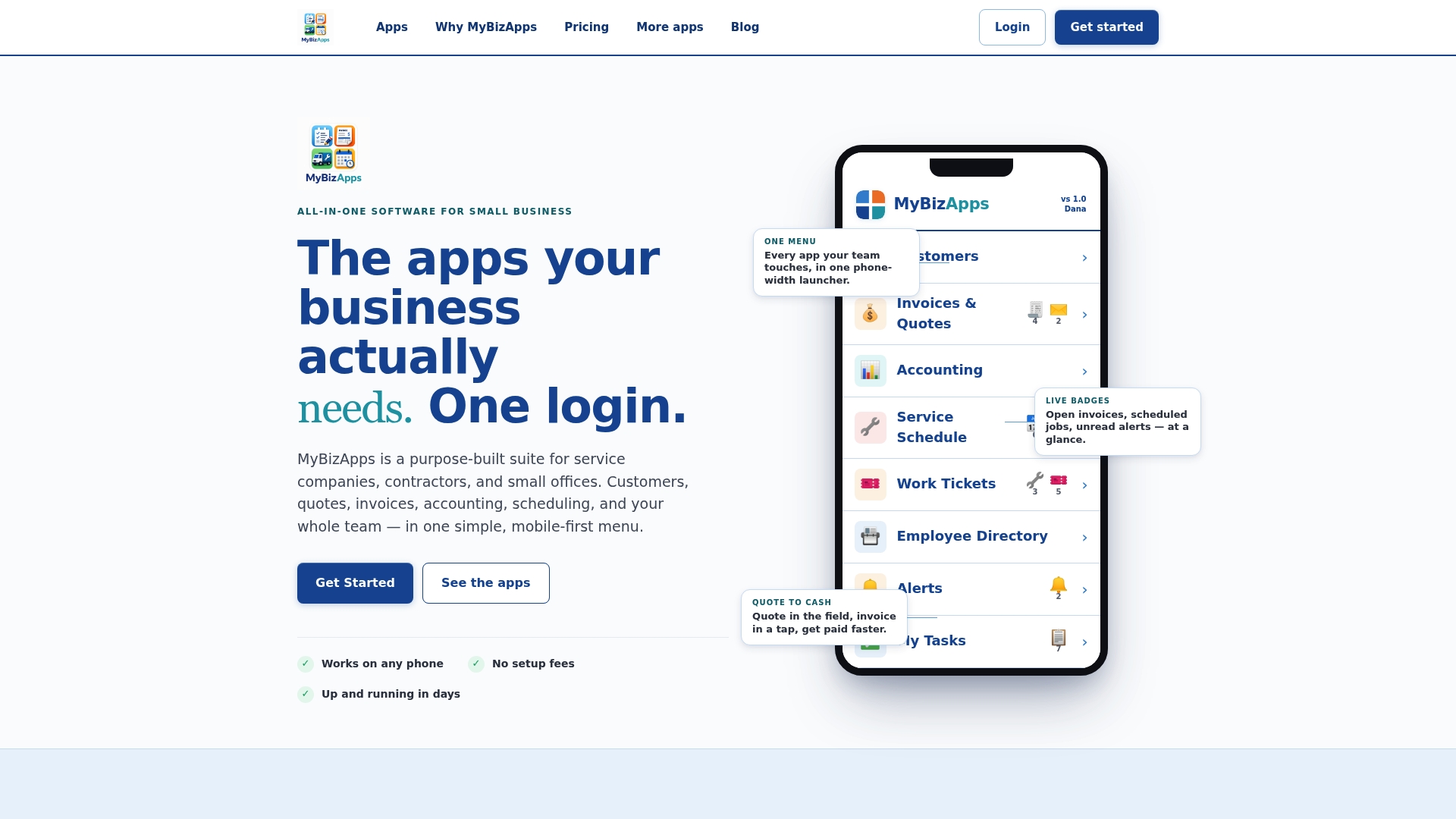
Mybizapps combines customer management, quoting, invoicing, scheduling, and payment processing under a single mobile-first login, so a technician can close a job on-site and the invoice, payment link, and reminder sequence go out without anyone opening a separate app later. Users report faster invoicing and payment cycles as a direct result, which tracks with the cash flow gains covered throughout this guide.
If you’re ready to see what that looks like for your business, check the pricing and modular add-ons to find the plan that fits your invoice volume, then start by turning on scheduled invoices and connecting a payment link. That one step alone is usually where the biggest DSO improvement shows up first.
Sources
- How to Automate Invoicing: Step-by-Step (2026) | Builts AI
- How to Automate Accounts Payable in 5 Steps in 2026 | G2
- How automation works in invoice processing | Stripe
- Late Paying Customers: Stop Repeat Delays