One Booking Page That Books: Build a Service Business Website
One Booking Page That Books: Build a Service Business Website
Build a focused, mobile-first website that gets bookings. Start with one service page carrying a live booking widget and a visible call-to-action, test it for real appointments, then expand. A service business website earns its keep only when it turns visitors into scheduled work, not when it looks polished.
TL;DR:
- Focus on launching a single service page with a live booking widget and clear call-to-action to start generating real appointments quickly.
- Ensure your phone number is clickable on mobile, add a sticky booking button, and keep lead forms short with only essential fields like name, phone, and service needed.
- Build your site starting with the homepage and services page, connect your booking and payment tools, then thoroughly test the entire process before going live.
- Prioritize real-time availability, calendar sync, automatic confirmations, and secure HTTPS to improve conversions and search engine rankings.
- Use an integrated platform for bookings, billing, and scheduling to streamline operations and accelerate invoicing, reducing administrative overhead.
Table of Contents
- How Do You Build a Service Business Website That Converts?
- Step-by-Step: How to Build Your Service Website From Scratch
- Which Booking and Payment Features Should You Require?
- What Technical Basics Actually Affect Rankings and Conversions?
- What Should You Budget and How Long Will It Take?
- Which Build Approach Fits Your Business?
- How an Integrated Platform Cuts Admin Time and Speeds Invoicing
- Keeping Your Site Running After Launch
- Security and Privacy for Booking and Payment Pages
- What I’d Prioritize If I Were Starting From Scratch
- Run Your Whole Business From the Site You Just Built
- Sources
- FAQ
How Do You Build a Service Business Website That Converts?
A service website converts when it does one job well: it makes booking, quoting, or calling easier than any competitor’s site does. That means every page has a purpose tied to the phone ringing or the calendar filling up, not just to looking professional.
Here are the pages a service business site needs, in the order visitors actually use them:
- Homepage: states what you do, who you serve, and where, with a booking or call button visible without scrolling.
- Services page: lists what you offer with clear scope and a pricing signal, even if it is just “starting at $X.”
- Booking or contact page: the actual scheduling tool or a form that asks for the details you need to quote fast.
- About page: a short story of who runs the business and why customers should trust you with their home, car, or health.
- Testimonials or portfolio: real reviews or before/after photos, placed near the booking button, not buried in a footer link.
- FAQ page: answers the five questions your front desk gets asked every week, which also happens to help search engines understand your services.
The conversion layer matters more than the design layer. A practitioner audit of small-business sites found that missing basics like a clear call-to-action, a working contact form, and structured data show up again and again, and each one quietly costs leads according to Frank Yao’s 2026 checklist review. That same audit found design polish rarely correlates with conversions the way a functioning phone number and contact form do.
A few specifics worth locking in before launch:
- Put your phone number in the header, clickable on mobile, not just typed as text.
- Add a sticky “Call Now” or “Book Now” button on mobile that follows the scroll.
- Keep lead form fields short: name, phone, service needed, and preferred timeframe. Four fields, not fourteen.
- Show your service area explicitly. “Serving Denver and surrounding suburbs” beats a vague “we come to you.”
- Add FAQ schema markup so search engines can pull your answers directly into results.
Pro Tip: Put your best testimonial directly under your primary CTA button, not on a separate page. A visitor deciding whether to book reads proof and action in the same glance, and that pairing converts better than either element alone.
Step-by-Step: How to Build Your Service Website From Scratch
Building a service website in the right order saves you from redoing work later. Skip a step and you end up rebuilding your navigation after the fact, which costs more time than doing it right the first time.
1. Define your primary outcome and your customer. Decide if the site’s job is to generate booked appointments, phone calls, or quote requests. A plumber wants calls. A hair salon wants bookings. A consultant wants quote requests. This decision shapes every page you build next, including which form fields you use and where your CTA points.
2. Choose your build approach. You have three real options, and each fits a different situation:
- DIY builder: you have time, basic comfort with drag-and-drop tools, and a tight budget. Judge any builder on how well it handles booking integrations and mobile editing, not just templates.
- Managed service: you want a done-for-you build without hiring an agency. Judge these on turnaround time, whether they include booking setup, and what happens after launch.
- Hire a specialist or developer: your business needs custom integrations, unusual workflows, or heavy e-commerce. Judge candidates on past service-business work and whether they can explain hosting and maintenance in plain terms.
If you want a platform you fully own long-term, an open-source option like WordPress gives you extensibility that a closed builder can’t match, especially once you start layering in custom booking logic or multiple service verticals.
3. Pick your domain and brand basics. Choose a domain that matches your business name or your primary service plus location if the exact name is taken. Settle on a logo, two or three brand colors, and one headline that states what you do and for whom, before you touch page layout. A service-focused template built around a single call-to-action outperforms a generic multi-purpose template almost every time.
4. Build core pages and connect booking and payments. Start with the homepage and services page, then wire in your booking tool so real-time availability shows up correctly. Connect a payment processor if you take deposits or online payment. Set up your contact form with lead notifications going to the right email or phone.
5. Test everything, then launch. Before you announce anything:
- Book a test appointment as if you were a customer, start to finish.
- Confirm the calendar sync actually updates your real schedule.
- Send a test payment through and confirm it lands where expected.
- Submit your sitemap to Google Search Console and add basic schema markup for your services.
Launching a single, working page beats sitting on a half-finished five-page site for another month. One checklist-based approach recommends launching one service page with live booking, measuring conversions for 30 days, then expanding based on which service actually pulls in bookings.
Which Booking and Payment Features Should You Require?
Booking functionality is what separates a working website from a digital business card. A brochure site tells people you exist; a booking-enabled site gets them on your calendar while they’re still motivated to hire you.
The features worth insisting on:
- Real-time availability: your booking tool should show actual open slots, not a generic “request a time” form that requires a follow-up call.
- Calendar sync: two-way sync with Google or Outlook calendars so a booked slot disappears from availability immediately.
- Intake fields for scope and pricing: ask enough upfront (square footage, vehicle type, service tier) to quote accurately without a back-and-forth.
- Two-way confirmations and reminders: automatic email or text confirmations, plus a reminder 24 hours out, which cuts no-shows significantly.
Customers now expect the kind of integrated flow that task-marketplace platforms popularized, where scheduling, payment, and review all happen inside one continuous experience, as seen in Taskrabbit’s booking model. Service businesses that make customers jump between a form, a separate calendar app, and a phone call to pay lose bookings to competitors who don’t.
On payments, decide upfront: do you collect a deposit, require full prepayment, or invoice after the job with an online payment link? Deposits work well for appointment-based services prone to no-shows. Full prepayment suits fixed-scope work. Invoicing with a payment link fits jobs where final cost depends on what the technician finds on-site.
Pro Tip: Before launch, run a complete booking as a stranger would. Book a slot, pay if payment is required, and confirm you get a notification, your calendar updates, and the transaction shows up correctly in your accounting system. If any link in that chain breaks silently, you won’t find out until a customer complains.
What Technical Basics Actually Affect Rankings and Conversions?
Hosting reliability and HTTPS security are not optional extras. A site that goes down during business hours or shows a “not secure” warning loses trust instantly, and browsers flag non-HTTPS sites explicitly to warn visitors away.
Managed builders typically handle this automatically; if you’re self-hosting through something like WordPress, confirm your host runs daily backups.
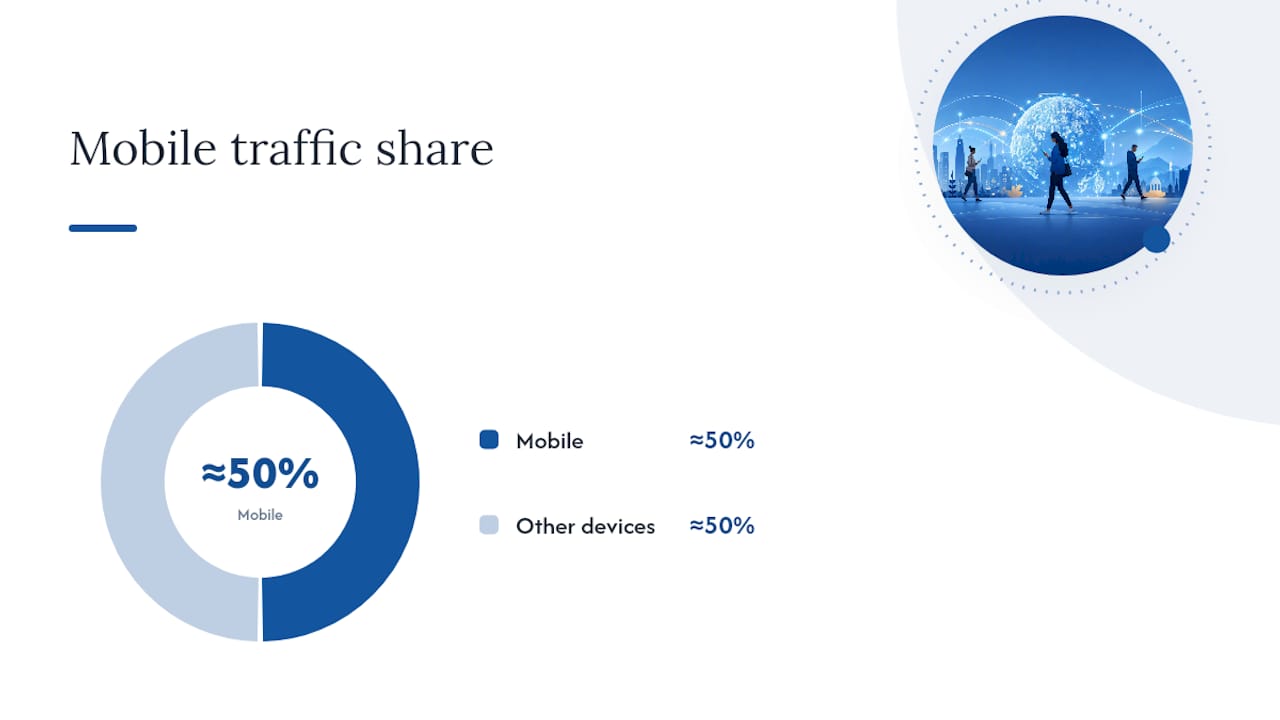
Mobile performance deserves its own line item. About half or more of all web traffic now comes from mobile devices, according to Statista’s tracking of mobile traffic share, which means a site that loads slowly or breaks on a phone screen is failing half your potential customers before they ever see your services.
By the Numbers: Roughly half of global web traffic arrives on mobile devices. A service site that isn’t built mobile-first is turning away a coin-flip’s worth of visitors before they even reach your booking button.
Fixes that make the biggest difference:
- Compress images before upload; a homepage hero image over 500KB slows load time noticeably on mobile connections.
- Enable browser caching so repeat visitors load pages faster.
- Test your mobile navigation menu with one thumb, the way a real customer would use it.
On SEO basics, don’t skip the boring items. Unique meta titles for every page and a submitted XML sitemap are two of the most commonly missed items in small-business site audits, per Frank Yao’s checklist findings. Set up Google Search Console and Analytics before launch, not after, so you have baseline data from day one. Add JSON-LD schema markup for your services and FAQ content, which helps search engines display rich results instead of a plain blue link.
Run a page speed test and a mobile usability check before you call the site finished. Both take five minutes and catch problems that cost you leads for months if left unaddressed.
What Should You Budget and How Long Will It Take?
Costs vary widely depending on how much you do yourself versus how much you hand off.
DIY costs run low: a domain name costs roughly $10 to $20 per year, a builder subscription or basic hosting plan runs $5 to $50 per month, and a premium template or plugin bundle might add a one-time fee or a small recurring cost.
Managed or agency builds cost more but save time. Expect a range of tiers: a basic managed build sits at the low end, a mid-tier build with booking and payment integration costs more, and a fully custom build with unique design and complex workflows sits at the high end. Monthly maintenance plans typically add an ongoing cost on top of the build fee. Treat any number here as a range to budget against, not a fixed quote you should expect everywhere.
Timelines follow a similar spread:
- A single-page launch with booking can go live in a matter of days.
- A multi-page site with booking and payment integration typically takes two to six weeks.
- A fully custom build with unique workflows or multiple service verticals takes longer, sometimes months.
If your budget is tight, prioritize booking functionality, lead capture forms, and basic analytics tracking over extra pages or custom design work. A working three-page site with a live booking calendar outperforms a beautiful ten-page site with no way to schedule anything.
Which Build Approach Fits Your Business?
The right approach depends on four factors: how much time you have, how comfortable you are with technology, your budget, and how complex your booking and integration needs are.
Here’s how those factors map to a decision:
- Quick launch, limited tech comfort, tight budget → a DIY builder with a service-focused template gets you live fast.
- Limited time, budget available for a done-for-you outcome → a managed service build makes sense; you’re paying for speed and someone else handling the technical setup.
- Complex workflows, multiple service lines, or deep integrations with scheduling and accounting → hire a specialist or use a platform built specifically to run those workflows together.
Before committing to any provider, ask direct questions: Can I see a live demo of a site you built for a service business? What’s the realistic timeline, in writing? What happens after launch if something breaks?
Pro Tip: Treat vague timelines as a warning sign. Any provider who can’t give you a specific launch date, and instead says “it depends,” usually means their process isn’t organized enough to hit one.
Red flags worth walking away from: no working demo site, no clear answer on post-launch support, and pricing that changes every time you ask a follow-up question.
How an Integrated Platform Cuts Admin Time and Speeds Invoicing
Most service businesses don’t fail at building a website. They fail at connecting it to the rest of the business, so bookings come in on the site while invoices get created somewhere else entirely, and nothing talks to anything.
MyBizApps offers bookings, a billing module, service scheduling, invoicing, and a customer portal under a single mobile-first login, which removes the gap between “customer booked” and “customer got billed.” Businesses using integrated setups like this report faster invoicing and fewer login switches between separate apps, which shows up directly as improved cash flow because payment requests go out closer to the moment work finishes, instead of sitting in a queue until someone remembers to invoice.
Connecting an integrated back end to your website doesn’t require custom development. Most setups work through an embeddable booking widget that drops into your services page, syncing appointments straight into the same system that handles your scheduling and invoicing. If you’re already thinking about how to avoid the double-booked truck problem that comes from juggling separate calendar and dispatch tools, this is the layer that fixes it at the source rather than patching around it.
Keeping Your Site Running After Launch
A website isn’t finished the day it goes live; it needs the same ongoing attention you’d give a piece of equipment that runs every day.
Set up automated backups immediately, whether through your hosting provider or your builder’s built-in system, so a bad update or a hacking attempt doesn’t wipe out months of content. Schedule a content refresh every quarter at minimum: update your service list if pricing changed, swap in new testimonials, and refresh any seasonal messaging that’s gone stale.
If you’re on a platform with plugins or third-party integrations, check for updates monthly. Outdated plugins are one of the most common ways small-business sites get compromised, and an update that breaks your booking calendar is far easier to fix in five minutes than to discover three weeks later when bookings mysteriously stopped coming in.
Watch your analytics monthly, not just at launch. A sudden drop in mobile traffic or a spike in bounce rate on your booking page usually points to something broken, not a marketing problem. Set a calendar reminder now, because “I’ll check on it eventually” is how sites quietly stop converting for months before anyone notices.
Security and Privacy for Booking and Payment Pages
Any page collecting a name, phone number, or card number carries real responsibility, and service businesses handle more of that data than most owners realize.
HTTPS encryption is the baseline, not a nice-to-have. Every booking or payment page needs a valid SSL certificate, which most hosting providers and builders now include automatically. If your site still shows “not secure” in the browser bar, fix that before anything else on this list.
For payment processing, never store card numbers directly on your own server. Use a processor that handles PCI compliance for you, so card data never touches your database at all. This is standard with virtually every modern payment integration, but it’s worth confirming explicitly with whoever sets up your booking or invoicing flow.
Customer data collected through booking forms, whether it’s a phone number, address, or appointment history, should sit behind the same login protection as your billing tools. Don’t let a booking form email raw customer details to an unsecured inbox as its only storage method. A privacy policy page, even a short one, tells customers you’re handling their information responsibly, and it’s increasingly expected rather than optional.
What I’d Prioritize If I Were Starting From Scratch
Most owners obsess over design when they should be obsessing over whether the booking button actually works on a phone with one bar of signal. Functionality drives revenue; polish drives compliments nobody pays for.
If I had to compress this into three moves: set up one booking test transaction before you worry about anything else, put a visible call-to-action above the fold on every page, and watch your first week of real conversion data before making a single design change. The data tells you what to fix. Guessing tells you what you assumed was broken.
— Philip
Run Your Whole Business From the Site You Just Built
A website that books jobs but can’t invoice them is only half a system. MyBizApps closes that gap by running bookings, billing, and scheduling from one mobile-first login, so the appointment a customer books on your new site flows straight into an invoice without you retyping a single detail into a second app.
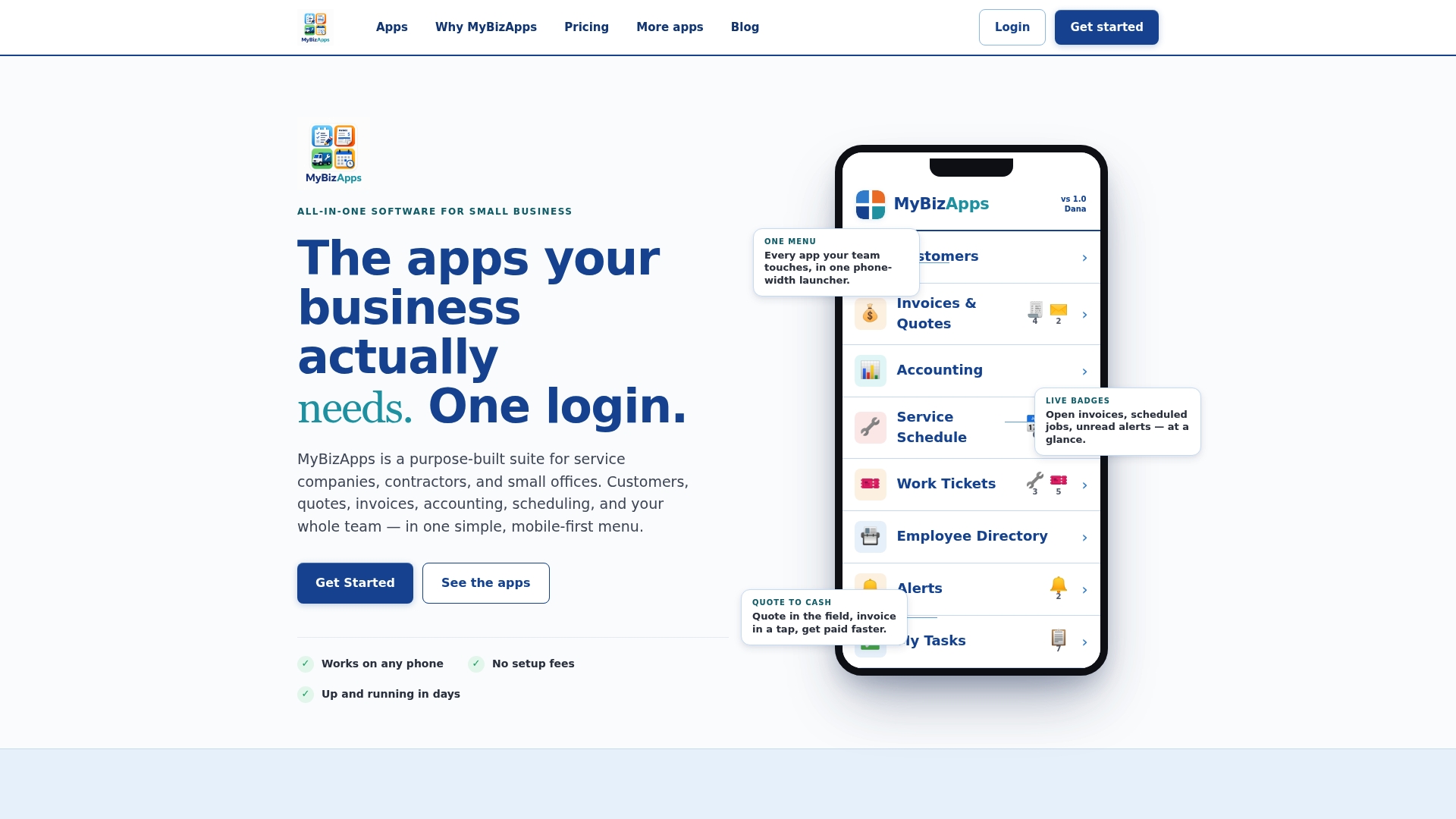
During a trial, test it the way a real customer and a real office day would use it: run a booking through from start to finish, generate an invoice off that booking, and log into the customer portal to see what your clients will see. Plans covering Bookings, Billing Module, and Service Scheduling are listed at $21 per month each, and you can review the full breakdown on the pricing page before deciding which modules your business actually needs. If you run a specialty shop, the Oil Change Shop configuration shows how a vertical-specific setup looks in practice. Start with one module, connect it to the booking page you just built, and see whether your invoicing gets faster in the first week.
Sources
- Share of website traffic coming from mobile devices | Statista
- Wordpress
- Small Business Website Checklist 2026 — 23 Items Most Web Designers Skip | Frank Yao
FAQ
Which website builder is best for service businesses?
The best choice depends on whether you need deep booking and billing integration or a simpler brochure site. A platform built specifically for service businesses, like MyBizApps, handles bookings, scheduling, and invoicing together, while an open-source option like WordPress suits businesses that want full ownership and are comfortable managing plugins themselves.
How much does it cost to pay someone to build you a website?
Costs vary by build complexity: a basic managed build sits at a lower price point, while a custom build with booking and payment integration costs considerably more, plus ongoing monthly maintenance. Treat any quote as a range tied to features, not a fixed number, and prioritize booking functionality over design extras if budget is tight.
How do I build a service-based website?
Start by defining your primary goal, whether that’s bookings, calls, or quote requests, then build a homepage and services page with a booking tool connected directly to your calendar. Test the full booking and payment flow before launch, then add pages like testimonials and FAQ as you grow.
Do I need an LLC to create a website?
No, you don’t need an LLC or any specific business structure to build or launch a website. You can build a site as a sole proprietor, though forming an LLC or similar entity is a separate legal and financial decision worth discussing with an accountant or attorney based on liability and tax considerations, not something the website itself requires.